Your OPT paperwork, done right, in about ten minutes.
Form I-983 is the training plan you and your employer fill in for the 24-month STEM OPT extension. Answer plain-English questions, send your employer a link for their part, sign on your phone, and download the official PDF — ready to hand to your DSO.
- Answer plain questions
- Your employer signs by link
- Download the official PDF
Start without an account — we ask for your email before your SEVIS ID, and that account is what saves your form, signs it and sends it.
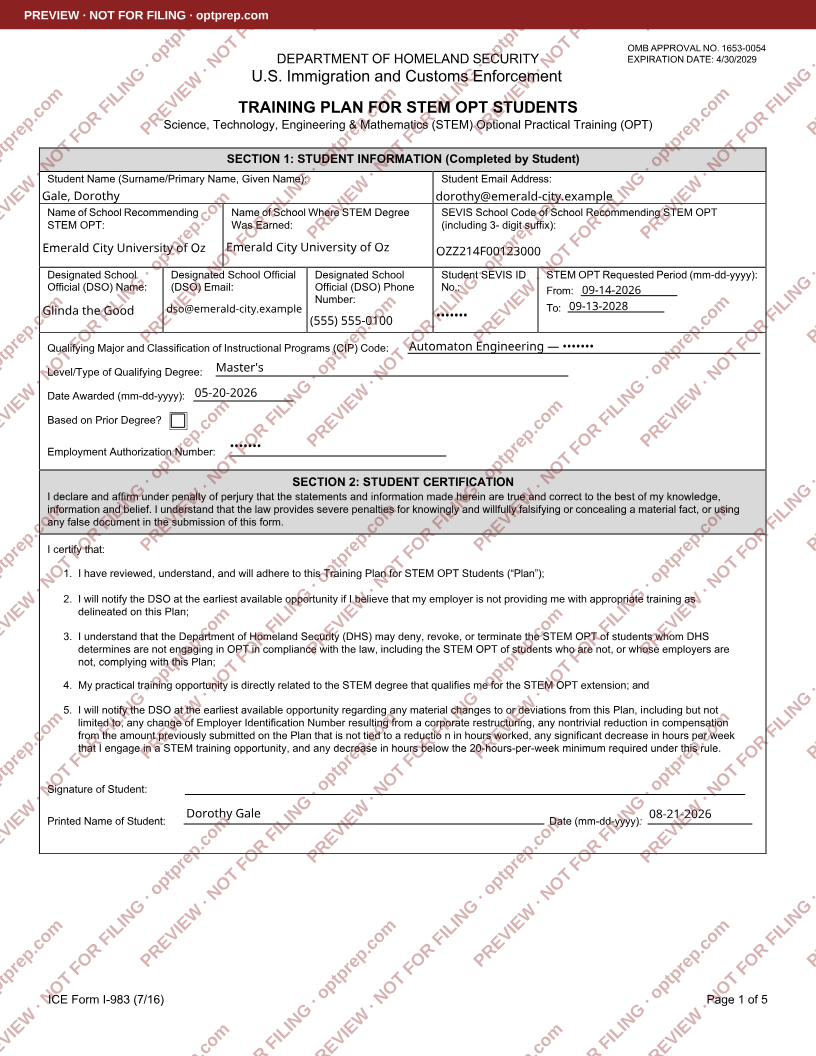
A sample Form I-983 filling in as six questions are answered: the student’s name and email, the school recommending the STEM OPT, the designated school official, the dates being requested, the qualifying degree, and the certification the student signs. The details are invented — not a real student.
A sample form, filled with invented details — not a real student. Numbers like a SEVIS ID are hidden here, and on your own form until you choose to reveal them.
OPT paperwork is a sequence, not one form.
Over about three years you fill in a few different forms. Here is the order, so you can see which stage you are in.
OPTAfter you graduate
One form: I-765, sent to USCIS. First your DSO recommends OPT in SEVIS and gives you a new I-20. This is the twelve months of work everyone means by "OPT".
We haven’t built Form I-765 yet.
STEM OPTThe 24-month extension
Two forms. The I-983 training plan goes to your DSO — not USCIS — and a second I-765 goes to USCIS. You and your employer each fill in part of the I-983, and you both sign it.
You can fill out Form I-983 here.We haven’t built the second Form I-765 yet.
12-month check-inA year into the extension
You write a short self-evaluation on the same I-983, your employer signs it, and it goes to your DSO.
We haven’t built the 12-month evaluation yet.
Final check-inAt the end of the 24 months
One last evaluation. You also start a new I-983 any time the job changes — a different employer, different hours, different pay, or a new supervisor.
We haven’t built the final evaluation yet.
Right now we build one of them: Form I-983, the STEM OPT training plan. It is the longest, and the one people get stuck on. The rest are on the way.
Not sure which stage you’re in? Ask your DSO — they decide what you can file, and they will tell you which form you need. We prepare the paperwork.
A form that should take minutes takes a day.
You download a PDF — an I-765 at graduation, an I-983 a year later. You find an editor you have never used. The boxes are too small for the training plan. You cannot work out how to sign it, so you print it, sign it, photograph it crooked, and email it to your DSO — who sends it back.
The fix is not a better PDF editor. It is never showing you a PDF field at all.
Answer plain questions
One step at a time, with your school’s details already filled in. Every step tells you how long it takes, and you can jump around and come back.
Send your employer a link
They fill Sections 3 and 5 and sign in their browser. No account. You get an email the moment they are done.
Sign and send
Sign in your browser — draw with your finger on a phone, or type your name. Prefer ink? Print a clean copy and sign it by hand. Then download the official PDF, or email yourself a copy — and send it to your DSO the way your school asks for it.
The mistakes that get forms sent back, caught first.
We check your answers against public government lists and show you exactly what was checked, against what, and when. We never tell you whether you qualify — that is your DSO’s call, and we say so.
- School code matches the SEVP list
- CIP 14.4201 is on the DHS STEM list
- Employer not found on the E-Verify list — ask HR
Right now, all of it is free.
Fill out your form, send your employer a link for their part, sign it, and download the finished PDF. There is nothing to pay and no card to enter.
We may start charging for some of this later. If we do, anything you have already made here stays yours and stays free — you will never be asked to pay for a form you finished while it was free.
“My manager filled his part from his phone during a standup. I had the signed PDF before lunch.”
“I had no idea the training plan needed that much detail. The draft gave me something to edit instead of a blank box.”
“Came back a year later for the 12-month evaluation and everything was still there. That alone was worth it.”
The things people actually ask.
Is this legal advice?
No. OPTPrep is a self-help document preparation tool. We are not attorneys, we do not represent you, and we do not file anything with USCIS on your behalf. Your DSO is the person who reviews and accepts your I-983.
Do I still need my DSO?
Always. Your I-983 goes to your school, not to USCIS. We help you complete it accurately and quickly, but your DSO reviews it and authorises your STEM OPT.
What do you check for me?
As you type, we check your answers against public government lists — the SEVP list of certified schools for your school code, the DHS E-Verify employer list, and the DHS STEM degree list for your CIP code. We show you exactly what was checked and when. We never tell you whether you qualify.
Is my information safe?
Your SEVIS ID, EAD number and passport number are encrypted before they are stored, and the key is not kept with the database. We never put them in a URL, a log, an email, or an analytics tool. On a shared or library computer, sensitive fields are never saved to the browser.
Do I need an account?
Not to start. You can open the form and fill in most of it with no account at all. We ask for your email — one code, no password — before you type a number like your SEVIS ID, so it is saved to your account instead of the computer you are on. You need that account to save your form, sign it, and send it.
Can my employer sign without an account?
Yes. You send them a link, they fill their sections and sign in their browser. No account, no PDF attachment, no back-and-forth.
Will my school accept an electronic signature?
Electronic signatures are widely accepted for the I-983, and SEVP has said they are acceptable. Some schools still prefer a printed, hand-signed copy — a clean print-and-sign PDF is always one click away. Check with your DSO if you are unsure.